

Description
TikTok-Themed Chrome Theme
Overview
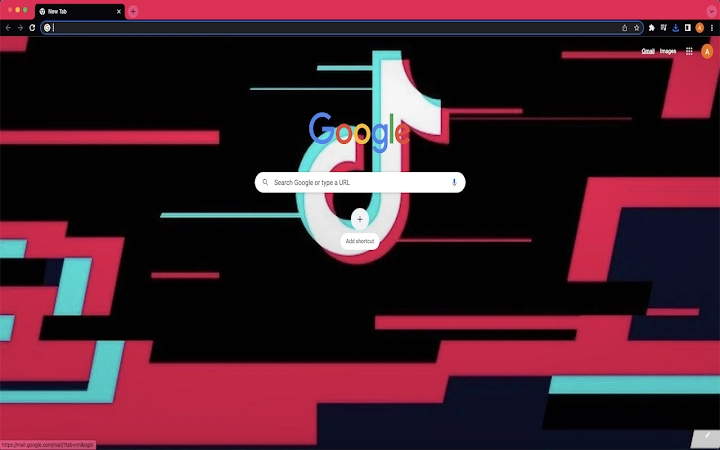
The software is a browser theme designed to replace the default appearance of the Chrome browser with a TikTok-inspired visual style. It targets users who wish to personalize their browsing experience with a trendy, social media-driven aesthetic. This theme is intended for casual users and digital creators who value visual expression and enjoy aligning their digital environment with current internet culture. The software does not alter browser functionality, focusing solely on the visual interface.
It is compatible with both Windows and Mac operating systems, making it accessible to a broad user base. The theme is delivered as a lightweight extension, requiring minimal system resources. Real-world usage scenarios include personalizing a work or study browser for visual motivation, enhancing a social media-focused browsing session, or simply experimenting with a fresh look without affecting browser performance or security.
Key Features & Capabilities
- TikTok-Themed Visual Design – Applies a vibrant, modern interface inspired by the TikTok app, including color schemes, button styles, and background elements consistent with the platform’s branding.
- One-Click Installation – Easily applied through the Chrome browser’s extension management interface, requiring no technical setup.
- Visual Customization – Offers a cohesive visual overhaul of the Chrome browser’s appearance, including tab styling, toolbar design, and new tab page layout.
- Non-Intrusive Integration – Does not interfere with browsing speed, navigation, or core browser features, ensuring a stable user experience.
- Simple Removal Process – Users can revert to the default Chrome appearance by resetting the theme through the browser’s settings, as detailed in the provided uninstall guide.
These features allow users to quickly transform their browser’s look to match a popular social media platform. The theme is ideal for users who enjoy expressive digital environments and want a subtle way to reflect their online interests. It does not include interactive elements or functionality beyond visual presentation.
User Interface, Workflow & Performance
The user interface of the software is entirely contained within the Chrome browser’s settings and extension management system. Users access the theme through the browser’s appearance settings, where it appears as a selectable option. The workflow is straightforward: install the extension, apply the theme, and view the changes instantly. No additional configuration is required.
Navigating between the browser’s standard features remains unchanged, ensuring a consistent experience. The theme does not introduce new menus, pop-ups, or interface elements. Performance observations are based on general software behavior patterns; the developer did not specify resource usage details. Stability is expected to be high, as the software is a visual theme and not a functional extension.
Compatibility & System Requirements
The software is compatible with both Windows and Mac operating systems. It is designed to work with the Chrome browser, though specific version requirements were not listed. The installation size is 1.5 MB, indicating a lightweight footprint. Exact system requirements were not listed, and the developer did not provide additional hardware specifications.
Users are advised to ensure their Chrome browser is up to date for optimal compatibility. The theme is intended for desktop use and does not support mobile platforms. No additional dependencies were identified in the provided information.
Pros and Cons
Pros
- Lightweight design with minimal impact on system resources
- Simple one-click installation and removal
- Visually appealing theme inspired by a popular social media platform
- Compatible with both Windows and Mac
- Does not interfere with browser functionality or performance
Cons
- No advanced customization options beyond the default theme
- Only available for Chrome browser
- Visual-only change with no functional enhancements
- Uninstall process requires manual steps in browser settings
- Not suitable for users seeking productivity or security features
FAQ Section
Is this theme available for browsers other than Chrome?
The software is designed exclusively for the Chrome browser. No information was provided regarding compatibility with other browsers such as Firefox or Edge.
Can I use this theme alongside other Chrome extensions?
Yes, the theme can be used in conjunction with other Chrome extensions. Since it only modifies the visual appearance, it does not conflict with functional extensions.
Is the theme safe to install?
As a browser theme distributed through official channels, it is considered secure. The software does not collect user data or access browsing history. However, users should always verify the source before installation.
How do I uninstall the theme?
To uninstall, go to Chrome Settings, navigate to the Appearance section, locate the theme in the list, and click the “Reset to Default” button to restore the original browser look.
Does this theme require an internet connection to work?
Once installed, the theme functions offline. However, an internet connection is required to initially download and apply the theme from the Chrome Web Store.
Final Thoughts
The TikTok-Themed Chrome Theme offers a simple yet effective way to refresh the look of your browser with a trendy, visually engaging design. While it serves no functional purpose beyond aesthetics, it caters well to users who value personalization and enjoy aligning their digital space with current online trends. Its lightweight nature and straightforward installation make it accessible to all skill levels.
For casual users and social media enthusiasts, this theme provides a quick and safe way to express individuality without compromising browser performance. It is not intended for productivity-focused or security-conscious users, but as a visual utility, it delivers on its promise.
Download TikTok-Themed Chrome Theme now
Guides & Tutorials for Tiktok Theme Theme for Chrome
How to install Tiktok Theme Theme for Chrome
- Click the Preview / Download button above.
- Once redirected, accept the terms and click Install.
- Wait for the Tiktok Theme Theme for Chrome download to finish on your device.
How to use Tiktok Theme Theme for Chrome
This software is primarily used for its core features described above. Open the app after installation to explore its capabilities.
User Reviews for Tiktok Theme Theme for Chrome 0
No reviews found





